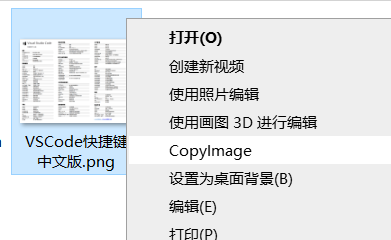
Win10 下复制图片发送到 QQ 群总是变成文件,每次要打开图片-复制-关闭图片也很繁琐。
市面上现有的工具不多:
Talk Is Cheap
保存为 pyw 文件用 pythonw.exe 执行避免出现一闪而过的黑框。
 1
 2
 3
 4
 5
 6
 7
 8
 9
10
11
12
13
14
15
16
17
18
19
20
21
22
23
24
25
26
27
28
29
30
31
|
# coding:utf-8

import sys
import traceback
import win32clipboard

from io import BytesIO
from PIL import Image


def send_to_clipboard(clip_type, data):
    win32clipboard.OpenClipboard()
    win32clipboard.EmptyClipboard()
    win32clipboard.SetClipboardData(clip_type, data)
    win32clipboard.CloseClipboard()


def copy_image_to_clipboard(args):
    image = Image.open(args)
    output = BytesIO()
    image.convert("RGB").save(output, "BMP")
    data = output.getvalue()[14:]
    output.close()
    send_to_clipboard(win32clipboard.CF_DIB, data)


if __name__ == "__main__":
    try:
        copy_image_to_clipboard(sys.argv[1])
    except Exception:
        traceback.print_exc()
|
注册表
简单功能不用特意找 winreg 标准库写一大堆东西,参考 如何使用 .reg 文件添加、修改或删除注册表子项和值
添加
只关联了 JPG 和 PNG 格式
 1
 2
 3
 4
 5
 6
 7
 8
 9
10
11
|
Windows Registry Editor Version 5.00

[HKEY_CLASSES_ROOT\SystemFileAssociations\.png\Shell\CopyImage]
@="CopyImage"
[HKEY_CLASSES_ROOT\SystemFileAssociations\.png\Shell\CopyImage\command]
@="<Your Python Path>\\pythonw.exe <Your Scipt Path>.pyw %1"

[HKEY_CLASSES_ROOT\SystemFileAssociations\.jpg\Shell\CopyImage]
@="CopyImage"
[HKEY_CLASSES_ROOT\SystemFileAssociations\.jpg\Shell\CopyImage\command]
@="<Your Python Path>\\pythonw.exe <Your Scipt Path>.pyw %1"
|
删除
在主菜单前加 - 即可
1
2
|
[-HKEY_CLASSES_ROOT\SystemFileAssociations\.png\Shell\CopyImage]
[-HKEY_CLASSES_ROOT\SystemFileAssociations\.jpg\Shell\CopyImage]
|
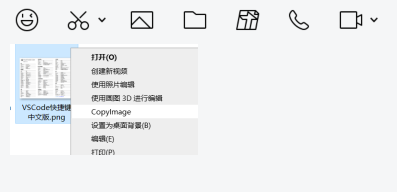
效果

References:
pyperclip/issues/198
Windows下.py文件右键没有Edit with IDLE的解决办法
运行python程序不显示cmd的方法
 次阅读
次阅读